Many companies think that working remotely means losing control.
In reality, the real limit is often another: processes are not clear, digitalized and measurable enough to work outside the office.
This means that any physical distance becomes an operational problem.
Information gets lost.
Activities are not updated.
Salespeople in the field work without alignment.
Managers chase employees with constant phone calls.
Corporate data ends up in uncontrolled channels.
The point is not where people work.
The key is whether the company has a system capable of maintaining visibility, security, and continuity wherever the team is located.
The problem isn't remote work.
The problem is remotely managing processes that have never been truly organized.
For this reason, remote business management today cannot be seen as a simple concession of flexibility.
It must become an operational model.
A system capable of connecting people, data, activities, customers, projects, and responsibilities in a single digital ecosystem.
Work has changed, but many processes have remained stagnant
In recent years the way we work has changed profoundly.
Smart working, distributed teams, local salespeople, external consultants, collaborators working from different locations, and operational staff moving between the office, clients, and home have become part of the norm for many companies.
But there's a problem.
Many companies have made work more flexible without making processes more robust.
They moved people and tasks out of the office, but left information, responsibilities, and workflows stuck in old habits.
E-mail.
WhatsApp.
Local files.
Phone calls.
Shared folders without rules.
Personal notes.
Continuous alignment meetings.
At first it seems to work.
Then the system begins to show cracks.
The manager doesn't know what's going on.
The team doesn't know who's supposed to do what.
The customer receives slow responses.
Negotiations are not updated.
Important information remains locked on individual devices.
According to Microsoft Work Trend Index 2026, Organizations are redesigning their operating models around AI, digital agents, and new forms of collaboration. This confirms a clear direction: modern work requires more intelligent, connected systems capable of supporting people and processes even in distributed environments.
It's not enough to allow people to work remotely.
It is necessary to allow the company to operate remotely.
The problem: Distance brings out disorganization
Distance does not create chaos.
It makes it visible.
When everyone is in the office, many inefficiencies are compensated for by physical presence.
You get up from your desk.
An update is requested from the colleague.
You retrieve a document by voice.
You check the status of a task with a quick meeting.
A doubt is resolved by moving from one room to another.
But when people are not in the same place, these informal mechanisms stop working.
And the company discovers something uncomfortable: many processes weren't really processes.
They were habits.
The problem is not the distance.
The problem is the lack of a shared structure.
If an activity can only be controlled by asking someone, it is not truly under control.
Effective remote business management must allow you to know:
- who is following a customer;
- at what point is a negotiation;
- which businesses are open;
- what deadlines are approaching;
- which documents were sent;
- which requests are pending;
- which data is updated;
- which steps require attention.
Without this information, remote work becomes a blur of texts, calls, and attempts at alignment.
And that's not control.
She's being chased.
Signs that remote management isn't working
When a company doesn't have a solid system, remote management sends very clear signals.
The key is to recognize them before they lead to losses of productivity, confidence, and opportunity.
1. The manager checks with continuous calls
The first sign is control anxiety.
Not seeing people at their desks, the manager feels the need to constantly check in.
Call.
He writes.
Organize meetings.
Asks for updates.
Ask where we are.
Check if the activity has been done.
This behavior arises from an understandable need: to maintain control.
But it produces the opposite effect.
Stop work.
Slow down the team.
Increase the pressure.
It creates mistrust.
Turn remote management into micromanagement.
The problem is not the manager.
The problem is that there is no system where activities, responsibilities and progress are visible.
If you have to call someone to find out what's going on, the process isn't transparent.
A well-designed digital system allows you to see the status of tasks, priorities, customers, deadlines, and results without constantly interrupting people.
Control should not depend on physical presence.
It must depend on the clarity of the process.
2. Information is fragmented across too many channels
The second sign is the dispersion of information.
A customer writes an email.
The sales representative replies on WhatsApp.
A document is in a shared folder.
There is a note on the phone.
An update has been given verbally.
A deadline is marked on a personal calendar.
When it comes to reconstructing the situation, no one has the whole picture.
This generates errors.
A document is not found.
A request is duplicated.
An answer comes late.
A customer has to explain the same problem again.
A colleague is working on old information.
The Salesforce Connectivity Report 2026 highlights how integration between systems and data is central to operational success: without connections between applications, data, and processes, the company risks creating fragmentation instead of efficiency.
This is even more true in remote management.
When data is scattered, work isn't truly flexible. It's just harder to control.
3. Field salespeople update negotiations too late
Many companies have sales teams that work out of the office.
They visit customers.
They attend meetings.
They collect requests.
They discuss offers.
They handle negotiations.
The problem arises when the information is updated only later.
At the end of the day.
At the weekend.
At the end of the month.
Or only when someone asks.
Meanwhile, the company remains in the dark.
Management does not know what negotiations are progressing.
The administration does not have updated data.
Marketing doesn't know which leads generate real opportunities.
Customer care does not know the promises made to the customer.
This information gap slows everything down.
A cloud CRM with smartphone access allows you to update a customer profile immediately after a meeting, add notes, attach documents, change the status of the deal, and schedule the next follow-up.
The value is not just practical.
It's strategic.
The data updated in real time allows the company to make earlier and better decisions.
4. Each employee works with his own method
Flexibility is helpful.
But without rules it becomes disorder.
An employee uses the personal calendar.
Another keeps notes in a file.
A salesperson updates an Excel spreadsheet.
A project manager works on a separate board.
Support uses email as an archive.
Everyone works.
But the company does not work as a system.
The result is that processes depend on individuals.
If a person is absent, information becomes difficult to retrieve.
If a contact person changes, the handover is slow.
When a customer calls, the person who answers doesn't always have the whole picture.
Remote management requires autonomy.
But autonomy only works within shared rules.
Gartner, in its Future of Work 2026 trends, emphasizes the importance of reducing friction during the most demanding moments of work, not just saving time. This point is crucial: a good digital system should not add complexity, it should remove friction.
The method does not limit the team.
It frees him from chaos.
5. Data security is not under control
The last signal concerns safety.
When a company works remotely without an adequate structure, data begins to move through channels that are not always protected.
Documents sent via WhatsApp.
Passwords shared in chat.
Files saved on personal computers.
Databases exported to uncontrolled devices.
Access not revoked when an employee changes roles or leaves the company.
This exposes the company to serious risks.
Not just technicians.
Also legal, reputational and commercial.
The Verizon Data Breach Investigations Report 2026 It highlights how cyber breaches are increasingly linked to software vulnerabilities, ransomware, human factors, and inadequate access management. For a distributed organization, this makes it even more important to centralize data and manage permissions, credentials, and traceability.
Remote work cannot be based on trust in personal devices.
It must be based on controlled access, centralized data and secure processes.
The consequence: flexibility without control
Remote work should make the company more agile.
But without a solid digital structure it can produce the opposite effect.
More channels to monitor.
More meetings to get aligned.
More messages to retrieve.
More data to search for.
More risks to manage.
More dependence on individuals.
Flexibility becomes confusion.
And confusion has a cost.
Wasted time.
Slow decisions.
Less followed customers.
Less effective commercials.
Less measurable processes.
Less secure data.
Untransformed business opportunities.
The real question isn't: "Can we work remotely?"“
The real question is: “Can we maintain control, quality, and security while working remotely?”
If the answer is no, the problem isn't smart working.
It's the corporate system.
The new vision: from physical to digital control
Many entrepreneurs still associate control with presence.
Seeing people in the office.
Knowing I'm at my desk.
Ask for updates by voice.
Check operations throughout the day.
But this model is no longer sufficient.
And often it's not even effective.
Modern control does not come from watching people work.
It comes from seeing processes work.
It means knowing:
- which businesses are open;
- which customers require attention;
- which negotiations are at a standstill;
- what deadlines are approaching;
- which documents were sent;
- which tasks have been completed;
- which KPIs are improving;
- what bottlenecks are slowing down work.
This is the crucial step.
Don't control people.
Control processes.
Don't multiply meetings.
Making data and accountability visible.
Don't chase updates.
Build flows that update as work progresses.
This is the basis of remote business management.
Cloud CRM as a corporate control room
To make this model operational, a central platform is needed.
One of the most effective tools is a cloud CRM.
Not intended as a simple customer database.
But as a control room to manage relationships, activities, negotiations, documents and communications.
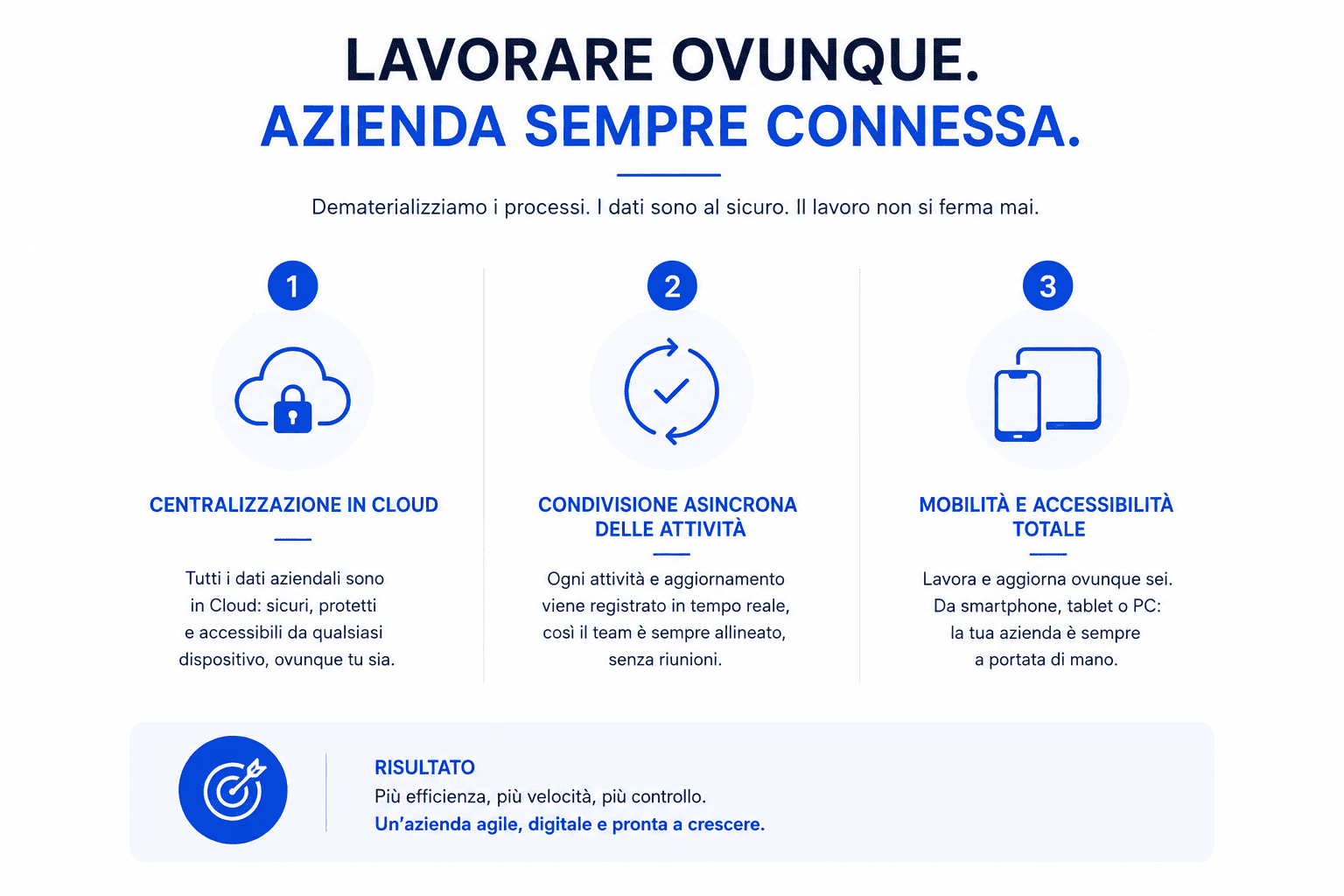
A cloud CRM allows a company to have a single environment, securely accessible from the office, home, smartphone, or tablet.
Within this environment you can manage:
- customer records;
- communications history;
- commercial activities;
- appointments;
- follow up;
- sales pipeline;
- ticket;
- documents;
- notes;
- deadlines;
- report;
- automations;
- access permissions.
This way, work is not dependent on physical location.
It depends on the process.
Cloud CRM becomes the company's operations office: always accessible, always up-to-date, always traceable.
What concretely changes with organized remote management
A well-designed remote business management is not just for “working away from the office”.
It helps make the company more readable, faster and more secure.
The data is centralized
Information doesn't stay on personal devices or in scattered files.
All important data goes into a single system.
This reduces duplication, errors and information loss.
Activities are visible
Each task can have a responsible person, a deadline, a status, and a priority.
The manager can see what is progressing without constantly interrupting the team.
Salespeople update from the field
After a visit, the sales representative can add notes, update the status of the deal, attach documents, and schedule the next contact.
The company doesn't wait days to find out what happened.
Handovers are smoother
When a business moves from sales to administration, from support to technical, or from marketing to sales, a trace remains.
This avoids information gaps and reduces misunderstandings.
Security is more controlled
Access, permissions and data are managed centrally.
If a person changes roles or leaves the company, access can be changed or revoked.
The information assets remain under control.
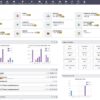
Management measures processes
Reports and dashboards help you understand what's working and what's not.
Not just how many activities have been done.
But where delays, blockages or opportunities are being created.
Remote Management and Conversions: The Often Missing Connection
Many companies think of remote management as an internal issue.
It actually has a direct impact on conversions too.
Because every contact generated by your website, SEO, ads, social media, or email campaigns must be managed consistently.
If a lead comes from the website but no one takes charge of it immediately, the digital investment loses value.
If a negotiation is not updated, the salesperson risks missing the right moment.
If a customer doesn't receive consistent responses, trust is weakened.
If the team doesn't see the history, the relationship starts from scratch every time.
Every contact not managed methodically is a conversion opportunity that goes cold.
For this reason, remote management must be connected to the digital ecosystem.
Website, landing page, forms, CRM, email, sales activities and support must communicate.
Only in this way does visibility become an opportunity.
And the opportunity can become a request, a negotiation and a customer.
How to organize remote business management
Remote management cannot be improvised.
We need a method.
1. Map processes before tools
Before choosing a platform, you need to understand how the company works today.
How do requests arrive?
Who takes care of them?
Where is the information saved?
How are tasks assigned?
Who controls the deadlines?
How does information flow between departments?
What data needs to be accessible remotely?
What permits are required?
Without this analysis, any tool risks becoming another level of confusion.
2. Centralize data and documents
The second step is to create a single environment to collect information, documents, customers, activities, and communications.
It doesn't mean everyone has to see everything.
This means that each person should only have access to what they need to work well.
With clear permissions and up-to-date data.
3. Define roles, responsibilities and deadlines
Every activity must have a manager.
Every negotiation must have a status.
Every customer must have a history.
Every deadline must be visible.
Every step must leave a trace.
This reduces ambiguity and constant requests for updates.
4. Automate notifications and follow-ups
Reminders, deadlines, recurring tasks, and follow-ups shouldn't depend on memory.
They should be automated where possible.
This makes work more fluid and reduces errors, oversights and delays.
5. Protect access and data
Remote management must be secure.
Profiled access, strong passwords, authentication, backups, permissions, traceability, and clear procedures are required.
Flexibility must not open gaps.
It needs to be designed.
6. Measure work on results, not attendance
Remote management works when the company stops measuring presence and starts measuring processes and results.
Activities completed.
Response times.
Updated negotiations.
Follow-ups performed.
Tickets closed.
Customers followed.
Conversions generated.
These are more useful indicators than just physical presence.
Mistakes to Avoid in Remote Business Management
Confusing smart working and improvisation
Working remotely doesn't mean having to make do with emails, chats, and scattered files.
It means building a digital operating model.
Controlling people too much and processes too little
Micromanagement creates stress and doesn't solve the problem.
It is important to make activities, responsibilities and progress visible.
Using too many disconnected tools
Every new, non-integrated tool increases fragmentation.
Better to have a few systems connected and used well.
Neglecting safety
Remote management requires attention to data, access, devices, and permissions.
Security is not a technical detail.
It is a condition for working flexibly.
Don't form the team
A cloud tool only works if people know how to use it and understand why it's important.
Training serves to create method, not just technical expertise.
Checklist: Can your business be managed remotely?
| Request | What does it indicate? |
|---|---|
| Are activities visible even without requesting updates? | The processes are traced |
| Is customer data centralized? | The information does not depend on individuals |
| Can salespeople update deals from their smartphones? | Field work is connected to the company |
| Do the departments share the same history? | Collaboration is more fluid |
| Do deadlines generate automatic notifications? | The process is not memory dependent |
| Are accesses profiled and revocable? | Data is more secure |
| Does management see reports and dashboards? | Control is data-driven |
| Do digital leads enter a structured flow? | Conversion does not stop after contact |
If many answers are negative, remote management is not yet under control.
And the problem isn't the distance.
It's the lack of a system.
FAQs on remote business management
How do you manage a business remotely?
A remote company is managed by mapping processes, centralizing data and documents, defining roles, using cloud tools, automating recurring tasks, and measuring work on processes and results.
What tools do you need to manage remote work?
The main tools are cloud CRMs, project management platforms, shared document systems, internal communication tools, control dashboards, automations, and security systems for access and data.
Is a cloud CRM useful for remote work?
Yes. A cloud CRM allows you to manage customers, deals, tasks, follow-ups, documents, and communication history from anywhere, maintaining centralized data and traceable processes.
How to avoid micromanagement when working remotely?
Activities, responsibilities, deadlines, and results must be made visible. When the process is tracked, the manager doesn't have to constantly monitor people, but can monitor progress and priorities.
How to protect data when your team works remotely?
Profiled access, secure credentials, authentication, backups, permissions, activity tracking, and reliable cloud tools are required. Data should not be managed via personal devices or uncontrolled channels.
Can remote work improve productivity?
Yes, if it's organized methodically. Productivity increases when people have accessible data, clear tasks, fewer interruptions, tracked processes, and integrated tools. Without a method, however, remote work can increase confusion and fragmentation.
Conclusion
Running a business remotely doesn't mean losing control.
It means building a different control.
More digital.
More measurable.
More transparent.
Safer.
More process oriented.
Physical presence can no longer be the only way to understand if the company is functioning.
You need a system that can display data, activities, responsibilities, deadlines, and results wherever your team is located.
Because real control doesn't come from seeing people in the office.
It comes from knowing that the processes are working.
Working remotely is not enough.
You need to manage your company remotely.
Want to understand if your company can work more flexibly without losing control?
DigiFe Analyze your processes, identify areas of dispersion, and configure customized cloud and CRM solutions to centralize data, activities, and communications.
This way you can give your team more autonomy, protect information, and maintain control of processes wherever you are.
Make your company more flexible, secure, and digital with DigiFe consulting.