
Many companies think that the problem is acquiring new customers.
In reality, the real limit is often another: failing to maintain value, trust and continuity after the sale.
Marketing generates leads.
The salesman closes the deal.
The customer buys.
But then the most delicate phase begins: assistance.
And this is where many companies lose what they have built before.
A request remains stuck in an email inbox.
A customer has to explain the same problem to several people.
The technical department does not know what the salesman had promised.
Support doesn't know if there are any contracts, deadlines, open tickets, or special conditions.
The customer waits, gets nervous and begins to lose confidence.
The problem is not just responding faster.
The challenge is building a system where every request is processed, tracked, assigned, resolved, and transformed into useful information for the entire company.
It's not enough to sell well.
We need better assistance.
Because conversion doesn't end when the customer signs.
It continues every time that customer asks for support, receives a response, evaluates the quality of the service and decides whether to stay, buy again or recommend the company to others.
Customer service is not a secondary department
When it comes to business growth, many companies immediately think of marketing campaigns, new leads, trade shows, sales, and customer acquisition.
These are fundamental activities.
But they only tell a part of the story of growth.
The other part is the ability to retain acquired customers.
A satisfied customer may buy again, purchase additional services, speak well of the company, and become a natural brand advocate.
A dissatisfied customer, on the other hand, may terminate the relationship even after a good sale.
For this reason, customer service should not be seen as the department that “handles problems”.
It must be seen as a strategic lever to protect trust, relationships, and turnover.
According to the report Qualtrics 2026 Consumer Experience Trends, Economic pressure, the use of AI, and feedback fatigue are changing consumer behavior. The bottom line is clear: companies can no longer afford fragmented, slow, or opaque experiences.
Also Zendesk CX Trends 2026 highlights an important theme: AI has raised expectations, but many customers still believe experiences should be better.
This means that technology alone is not enough.
A process is needed.
Effective customer service doesn't come from isolated responses.
It arises from clear internal flows, shared data, and defined responsibilities.
The problem: the customer pays the price of internal disorganization
When a customer receives slow or confusing support, the problem is often not due to the operators' lack of willingness.
It depends on what happens behind the scenes.
Departments do not share information.
Requests arrive on different channels.
Emails remain in personal inboxes.
Salespeople don't update history.
The technicians do not see what was promised during the sales phase.
Support works without context.
The customer, however, does not see all this.
He only sees the result.
A slow response.
A lost request.
An unsolved problem.
An operator who knows nothing about his situation.
A company that seems to have no control.
And this is where the frustration arises.
Every time a customer has to repeat information already given, trust is weakened.
The customer does not only judge the product or service.
Judge the whole experience.
And support is one of the most visible parts of this experience.
Signs that customer support isn't working
Disorganization in care doesn't suddenly erupt.
It sends very clear signals.
The key is to recognize them before they become negative reviews, lost customers, or unmanageable requests.
1. Requests arrive on too many channels and get lost
A customer writes an email.
Another sends a WhatsApp message.
Another calls the salesman.
Another fills out the form on the website.
Yet another writes to a generic address.
If there is no single system to collect these requests, the risk is very high.
Some reports are seen immediately.
Others remain still.
Others are duplicated.
Others end up with the wrong person.
Others are never tracked.
This creates reactive and messy management.
We intervene on what is loudest, not on what is most important.
An untracked request is not under control.
2. The customer must tell everything from the beginning
One of the most serious signs is “ruptured disc syndrome”.
The customer calls once.
Explain the problem.
Call back after a few days.
Find another contact.
He has to start over.
This creates a very negative perception.
Not because the customer doesn't want to explain.
But why do you expect the company to have memory?.
If you have already submitted a report, please wait for it to be recorded.
If you have already spoken to a sales representative, you expect support to know what has been agreed upon.
If you have already opened a ticket, you expect someone to know the status of the issue.
When this does not happen, the customer perceives disorder.
And clutter undermines confidence.
A customer should never pay the price for a lack of internal communication.
3. Departments work as separate islands
In many companies, sales, support, technical, and administration work on the same customer, but with different information.
The salesman knows the negotiation.
The administration knows invoices and payments.
The technician is aware of the operational problem.
Support is aware of the open request.
Management only sees part of the data.
The result is a fragmented vision.
And when the company sees the customer in pieces, the customer also receives a broken experience.
The problem is not the presence of different departments.
The problem is the lack of a common flow.
Customer support only works when sales, after-sales, administration and technical departments share the same context.
4. There is no clear priority
Without a structured system, requests are often handled based on the pressure of the moment.
Those who call repeatedly get attention.
Whoever complains the most gets dealt with first.
Whoever has the most persistent contact gets a quicker response.
But this is not organization.
She's being chased.
Effective assistance must be able to classify requests according to clear criteria:
- urgency;
- customer impact;
- customer value;
- active contract;
- type of problem;
- deadlines;
- ALS;
- department involved;
- ticket opening time.
Without priorities, the team works under pressure.
And customers perceive inconsistency.
5. Times, problems and results are not measured
Many companies manage support without clear KPIs.
They don't know how many tickets are open.
They don't know how long they've been stuck.
They don't know what problems are repeating themselves.
They don't know which customers open the most requests.
They don't know which operators are overloaded.
They don't know how long it takes to solve a problem.
Without this data, improvement becomes difficult.
We work on emergencies, not on causes.
If you don't measure care, you can only suffer it.
The consequence: slow service, frustrated customers and revenue at risk.
Disorganized care isn't just annoying.
It produces economic consequences.
An unsatisfied customer may buy less.
You can end the relationship.
You can choose a competitor.
You can leave a negative review.
You can stop recommending the company.
It can absorb much more operating time.
The damage is therefore not only reputational.
It's commercial.
Because every lost customer must be replaced by a new customer.
And acquiring new customers requires budget, time, marketing, sales, and follow-up.
This is why customer retention is not a secondary issue.
It is a lever of profitability.
Weak support can destroy the trust built over months of selling in minutes.
The new vision: after-sales is part of the conversion
Many companies see conversion as the moment a customer buys.
But this is an incomplete vision.
Conversion continues after the sale.
Continues when the customer receives assistance.
Continue when the problem is resolved.
Continue when the team responds clearly.
It continues when the company demonstrates that it has a memory.
It continues when the customer understands that he can count on a reliable service.
After-sales is not the end point.
It is the moment when the promise made by marketing and sales is confirmed or denied.
If the support works, the customer strengthens their trust.
If assistance fails, the entire previous path loses value.
Loyalty doesn't come from a polite phrase.
It comes from a process that works when the customer needs it.
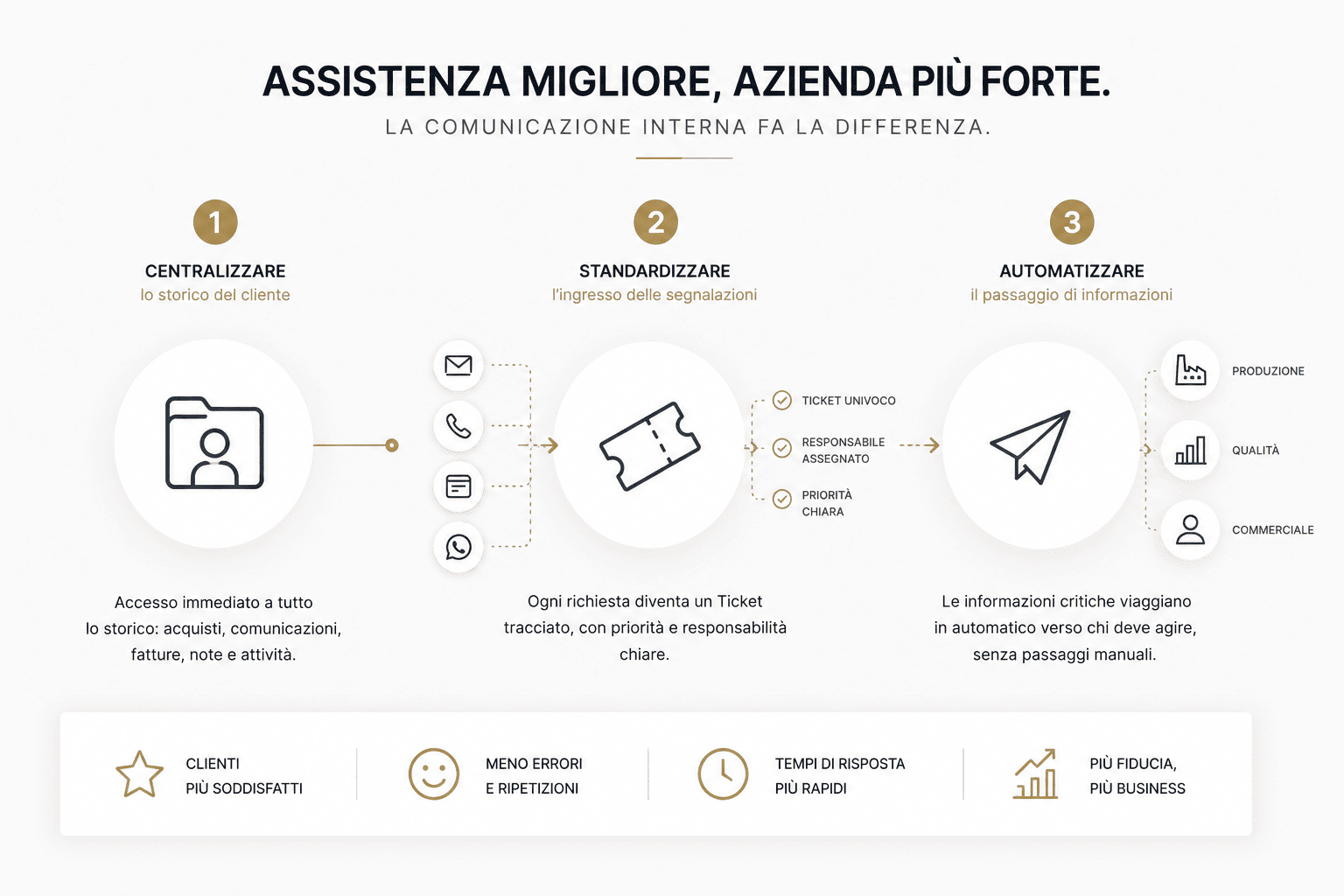
Centralize customer history
The first step to improving customer service is to centralize your history.
Whoever manages a request must be able to see immediately:
- who is the customer;
- what he bought;
- which contracts are active;
- what conditions were agreed upon;
- which tickets have already been opened;
- what problems have recurred;
- which emails were exchanged;
- what commercial notes are present;
- what deadlines are approaching;
- which departments are involved.
Without this information, support is working in the dark.
With this information, you can respond more quickly, accurately, and in a more personalized way.
The report Zoom Customer Service Management 2026 He clearly distinguishes the roles of CRM and Customer Service Management: CRM collects contacts, accounts, cases, and history; CSM organizes routing, workflows, automation, knowledge base, and service quality.
This point is important.
Having a customer database is not enough.
We need a system that transforms history into action.
Customer data must be accessible when needed.
Standardize request entry with ticketing
The second step is to transform each request into a ticket.
A ticket is much more than a report.
It is a tracked, assigned and manageable request.
Each ticket should have:
- unique code;
- connected customer;
- source channel;
- opening date;
- object;
- description;
- priority;
- responsible;
- state;
- expiration;
- possible SLA;
- update history;
- closing date;
- outcome.
This allows the company to always know what is open, who is following it, and what is missing to close it.
Ticketing eliminates one of the main causes of chaos: the informal request.
An untracked email can get lost.
A WhatsApp message can be forgotten.
A phone call may leave no trace.
A ticket, however, enters the process.
Every request must become visible, assigned and measurable.
Automate internal steps
The third step is to automate where possible.
Not all tasks need to depend on manual steps.
For example:
- a technical request can be automatically assigned to the correct department;
- an urgent ticket can generate a notification;
- a request that has been open for too long may trigger an alert;
- a customer with many recent tickets can be reported to sales;
- a recurring issue can be sent to production;
- a closed ticket can generate a satisfaction survey;
- A frequent request can feed a knowledge base.
Automation should not replace relationships.
It must reduce repetitive errors.
And it must allow the team to focus on problems that require expertise, empathy, and decisiveness.
Forrester, in its 2026 customer service forecasts, emphasizes that AI in customer service will not deliver value through spectacular effects, but through fundamental work on processes, data, knowledge management, governance, and quality.
This confirms a key point.
Before you automate support, you need to organize the flow.
CRM as the center of customer service
Integrated CRM can become the operations center of customer support.
Not just because it collects data.
But because it connects departments, activities and history.
With a well-configured CRM, the operator can open a customer card and see:
- personal data;
- commercial historian;
- estimates;
- products purchased;
- contracts;
- open tickets;
- closed tickets;
- internal notes;
- deadlines;
- communications;
- documents;
- customer value;
- future activities.
This completely changes the way we assist.
The operator no longer responds starting from zero.
Respond with context.
The technician doesn't just receive a generic sentence.
Receives a structured request.
The salesperson doesn't discover too late that a customer is dissatisfied.
Get an alert before the relationship deteriorates.
CRM isn't just for selling.
It helps protect the relationship after the sale.
AI and customer service: beware of clutter
By 2026, many companies are introducing AI, chatbots, and digital agents into customer support.
But there is a risk.
If data is messy, processes are unclear, and information is fragmented, AI won't solve the problem.
It amplifies it.
An AI agent can only be useful if it works on up-to-date knowledge bases, clear rules, reliable data, and well-designed flows.
An academic study from 2026, Beyond IVR: Benchmarking Customer Support LLM Agents for Business-Adherence, highlights the need to evaluate AI agents not only on their ability to complete tasks, but also on their adherence to company rules, policies, and workflows.
This is crucial.
Because in customer service, it's not enough to just answer.
We must respond correctly, respecting processes, constraints and responsibilities.
AI does not replace method.
He requires it.
KPIs to monitor to improve customer service
To improve care, you need to measure it.
Some key KPIs are:
| KPIs | What does it measure? | Why it matters |
|---|---|---|
| Open Tickets | Number of active requests | Show team load |
| Average first response time | Time needed to respond to the customer | It affects the perception of attention |
| Average resolution time | Time needed to close the issue | Measure process efficiency |
| Tickets reopened | Requests closed but not really resolved | Indicates quality problems |
| SLAs respected | Percentage of tickets handled within the expected timeframe | Measure reliability and consistency |
| Recurring problems | Frequently asked questions on the same topic | Helps address the causes |
| Customer satisfaction | Satisfaction after the surgery | Measure perceived quality |
| Churn risk | Customers at risk of abandonment | Help intervene before it's too late |
| Ticket per customer | Number of requests per single customer | Highlight critical situations |
| Escalation | Tickets upgraded to higher levels | Indicates complexity or information gaps |
This data is not used to monitor people.
They serve to improve the process.
Measured care becomes improvable.
Unmeasured care remains a sensation.
How to improve customer service: operational method
Improving customer service isn’t just about “responding first.”.
It means building a clear flow.
1. Map the input channels
First we need to understand where the requests are coming from.
E-mail.
Telephone.
Form.
WhatsApp.
Reserved area.
Social.
Commercials.
Technicians.
Each channel must be governed.
If a channel doesn't fit into the system, it's a blind spot.
2. Centralize requests
All reports must flow into a single system.
It doesn't matter where they come from.
They must become traceable tickets.
3. Define priorities and responsibilities
Each request must have a priority, a responsible party, and a status.
Open.
In progress.
Waiting for the customer.
Waiting for the technician.
Resolved.
Closed.
This reduces ambiguity and blockages.
4. Connect support, sales and administration
Customer care needs to see what is needed.
The salesperson needs to know if a customer is having problems.
The administration must be updated if the ticket concerns payments, contracts, or documents.
The technical department must receive complete requests.
5. Automate notifications and escalations
Automations help you remember open tickets, urgent requests, critical customers, and deadlines.
A ticket that has been pending for too long should generate an alert.
A customer with many requests should be reported.
A recurring problem needs to be analyzed.
6. Create an internal knowledge base
Many problems repeat themselves.
A knowledge base helps operators and technicians respond faster and more consistently.
Reduces errors, training time, and dependency on individuals.
7. Analyze data and improve the process
Every month you need to look at:
- what problems recur;
- which customers open the most tickets;
- what times are getting worse;
- which departments slow down the flow;
- which answers work best;
- which interventions reduce the number of requests.
Support shouldn't just solve problems.
It must help the company understand where to improve.
Mistakes to Avoid in Customer Service
Handle requests via email only
Email is useful, but it's not enough.
Without ticketing, priority, status, and a responsible party, requests risk getting lost.
Separate support and sales
After-sales service is part of the business relationship.
If the salesperson doesn't know that a customer is dissatisfied, they may miss the right moment to intervene.
Don't track history
Every request must leave a record.
Without history, every contact starts from scratch.
Automate without method
A chatbot or automation doesn't solve a messy process.
First you map the flow.
Then it gets automated.
Don't measure satisfaction
Closing a ticket doesn't always mean the problem has actually been solved.
It is necessary to collect feedback and measure perceived quality.
Checklist: Is Your Customer Service Really Working?
| Request | What does it indicate? |
|---|---|
| Do all requests enter into a single system? | The flow is centralized |
| Does each request have a responsible person? | The process is assigned |
| Does the customer have to repeat information already given? | The history is not accessible |
| Do tickets have clear priorities? | Emergencies are governed |
| Do departments share information? | Support is company-related |
| Are response times measured? | The service can be improved |
| Are recurring problems analyzed? | The company works on the causes |
| Do salespeople see customers as at risk? | After-sales protects the relationship |
| Is there an internal knowledge base? | The answers are more coherent |
| Do automations help the team? | The process does not depend only on memory |
If many answers are negative, the problem is not just support.
It is the internal system that does not allow the assistance to function properly.
FAQs on how to improve customer support
How do you improve customer service?
It improves by centralizing requests, turning them into tickets, assigning clear responsibilities, connecting departments, tracking customer history, measuring KPIs, and automating repetitive steps.
Why is customer service important for loyalty?
Because customers value a company especially when they need support. Good customer service strengthens trust and relationships; slow or confusing support can jeopardize even a well-managed sale.
What is a ticketing system?
It's a system that transforms every support request into a tracked report, complete with code, priority, responsible party, status, history, and handling times.
Is CRM also useful for customer support?
Yes. An integrated CRM allows you to view customer history, contracts, communications, tickets, activities, and sales information, helping your team respond with more context and precision.
What KPIs should you measure in customer care?
The main KPIs are first response time, resolution time, open tickets, reopened tickets, SLAs met, customer satisfaction, recurring issues, and churn risk.
Can AI improve customer service?
Yes, but only if the data is organized and the processes are clear. Without proper knowledge bases, governance, and flows, AI risks amplifying errors and inconsistent responses.
Conclusion
Improving customer service isn't just about responding faster.
It means building a system that allows the company to avoid losing requests, information, priorities, and trust.
The customer does not judge the separate departments.
Rate the overall experience.
If marketing promises, sales convinces, and customer service disappoints, the end result is a weakened relationship.
For this reason, after-sales must be connected to the rest of the company.
Shared data.
Tracked tickets.
Accessible history.
Departments aligned.
Intelligent automations.
Clear KPIs.
Measurable processes.
It's not enough to acquire customers.
We need to build a system capable of maintaining them, serving them and transforming them into value over time.
Want to understand where your customer service is losing requests, time, and trust?
DigiFe Analyzes internal communication flows, identifies points of dispersion, and configures customized CRM and ticketing solutions to centralize requests, improve response times, and make after-sales a true loyalty tool.
Improve your Customer Experience with the DigiFe team.