
Many companies think that the problem is having little time.
In reality, the real limit is often another: too much time is consumed by repetitive, manual, low-value tasks.
Copy data from one file to another.
Send standard emails.
Solicit approvals.
Update Excel sheets.
Create customer cards manually.
Double-check deadlines.
Entering the same information into multiple systems.
Each individual activity may seem small.
But added together they become an enormous cost.
Wasted time.
Errors.
Delays.
Bottlenecks.
Team frustration.
Margins that are shrinking.
Customers waiting for slower responses.
The point is not just to work faster.
The key is to understand how much of a company's operations still depend on manual actions that could be digitized, standardized, or automated.
The problem is not doing many things.
The problem is doing things manually that should no longer depend on human memory or repetition.
This is why automating repetitive business processes is not just a choice for large companies today.
It's also a concrete lever for SMEs that want to grow without increasing chaos, costs, and complexity.
Time wasted in manual processes is not immediately visible, but it weighs on you every day.
In many companies, manual work is not perceived as a problem.
Because it's always been done that way.
The salesperson updates a file.
The administration copies the data.
Customer care sends manual confirmations.
The manager checks deadlines on a calendar.
The technician receives instructions via email.
The owner verifies everything verbally.
At first it seems normal.
Then the company grows.
Customers are increasing.
Estimates are increasing.
Requests are increasing.
The documents are increasing.
The number of passages between departments is increasing.
The exceptions are increasing.
And what once seemed manageable becomes a brake.
The team works hard, but produces less value than it could.
Not because there is a lack of expertise.
But because a significant portion of energy is absorbed by repetitive operational activities.
According to 2026 Workflow Automation Outlook from Deloitte and ServiceNow, companies are moving from isolated automations to more integrated models, where AI-ready architectures, process transformation, and human-machine collaboration become essential to creating real impact.
This point is crucial.
Automation is not about adding technology.
It serves to redesign the way work flows within the company.
The problem: Manual work creates errors, delays, and bottlenecks
Manual labor has a natural limit: it depends on people's concentration, memory, and availability.
And people, even when they are good, can make mistakes.
A badly copied piece of data.
A forgotten email.
A file was saved in the wrong folder.
An unsent notification.
A missed deadline.
A customer not called back.
An approval that is firm because a signature is missing.
These aren't just small mistakes.
These are signs of a weak process.
When operations depend on too many manual steps, the business becomes slower and more vulnerable.
Each department expects something from another department.
The salesperson closes the sale, but the operational phase doesn't start.
The customer fills out a form, but no one calls him back.
A quote requires approval, but remains firm.
A support request is read, but not assigned.
A contract renewal expires without a reminder.
The problem is not a single oversight.
The problem is that the process allows forgetfulness to cause harm.
Any critical activity that relies solely on memory is a weak point in the company.
The hidden costs of repetitive tasks
Repetitive tasks don't just take up time.
They also impact margins, quality, motivation, and growth.
Operational errors
When data is entered manually into multiple systems, errors are always possible.
An incorrect product code may result in an incorrect shipment.
A poorly copied price can create a dispute.
An incomplete address can slow down a delivery.
Duplicate records can create administrative confusion.
Every mistake takes time to correct.
And often the cost of the fix is greater than the time saved by not digitizing the process.
Bottlenecks between departments
When a step is not automatic, the process stops.
Wait for an email.
Wait for a response.
Wait for approval.
Wait for someone to update a file.
Wait for someone to remember to notify a colleague.
The result is a slow operational chain.
Not because people don't work.
But because the flow is not designed well.
Team frustration
Qualified people don't want to spend hours copying data, sending boilerplate messages, or chasing approvals.
They want to solve problems, serve customers, improve projects, make decisions, create value.
When daily work is filled with repetitive tasks, the team loses energy.
And a tired team produces less quality.
Weaker customer experience
Automation isn't just about internal operations.
It's also about the customer.
If a lead doesn't receive confirmation.
If a customer is not updated.
If a request remains unresolved.
If a renewal is not handled.
If a ticket is not assigned.
The customer perceives slowness.
And slowness undermines confidence.
Every slow internal process eventually becomes a weaker customer experience.
The consequence: the company grows, but remains stuck in low-value activities
The paradox is this.
The company wants to grow, but part of the team remains trapped in activities that don't really lead to growth.
The more customers arrive, the more manual steps increase.
The more requests arrive, the more emails increase.
The more estimates there are, the greater the risk of error.
The more departments involved, the more alignment is needed.
The more work you do, the more the system becomes burdened.
Growth, without automation, can become a multiplier of inefficiencies.
It's not enough to hire new people.
If the process is messy, adding resources can only further spread the chaos.
The solution is not to do more.
The solution is to make the work flow better.
Automating does not mean taking away human value.
It means taking away from people the burden of activities that don't really require their value.
The new vision: don't automate everything, automate what slows down value
A common mistake is to think that automation means “automating everything.”.
It is not so.
Automating without a method can create even more confusion.
First you need to understand which processes are repetitive, which are critical, and which generate the most waste.
The question is not:
“What can we automate?”
The better question is:
“What steps are slowing down customers, teams, sales, support, or decisions?”
Useful automation must have a clear purpose.
Reduce errors.
Speed up responses.
Eliminate double entries.
Connect departments.
Enable notifications.
Standardize approvals.
Don't miss deadlines.
Making visible what remains hidden today.
PwC, in its AI 2026 forecasts, emphasizes that applying AI and automation to old processes only yields small improvements. True value arises when processes are rethought end-to-end, replacing manual and fragmented flows with more integrated models.
That's the point.
Technology only works when it starts from a clear process.
Which business processes can be automated?
Every company has different flows.
But there are areas where automation can produce immediate value.
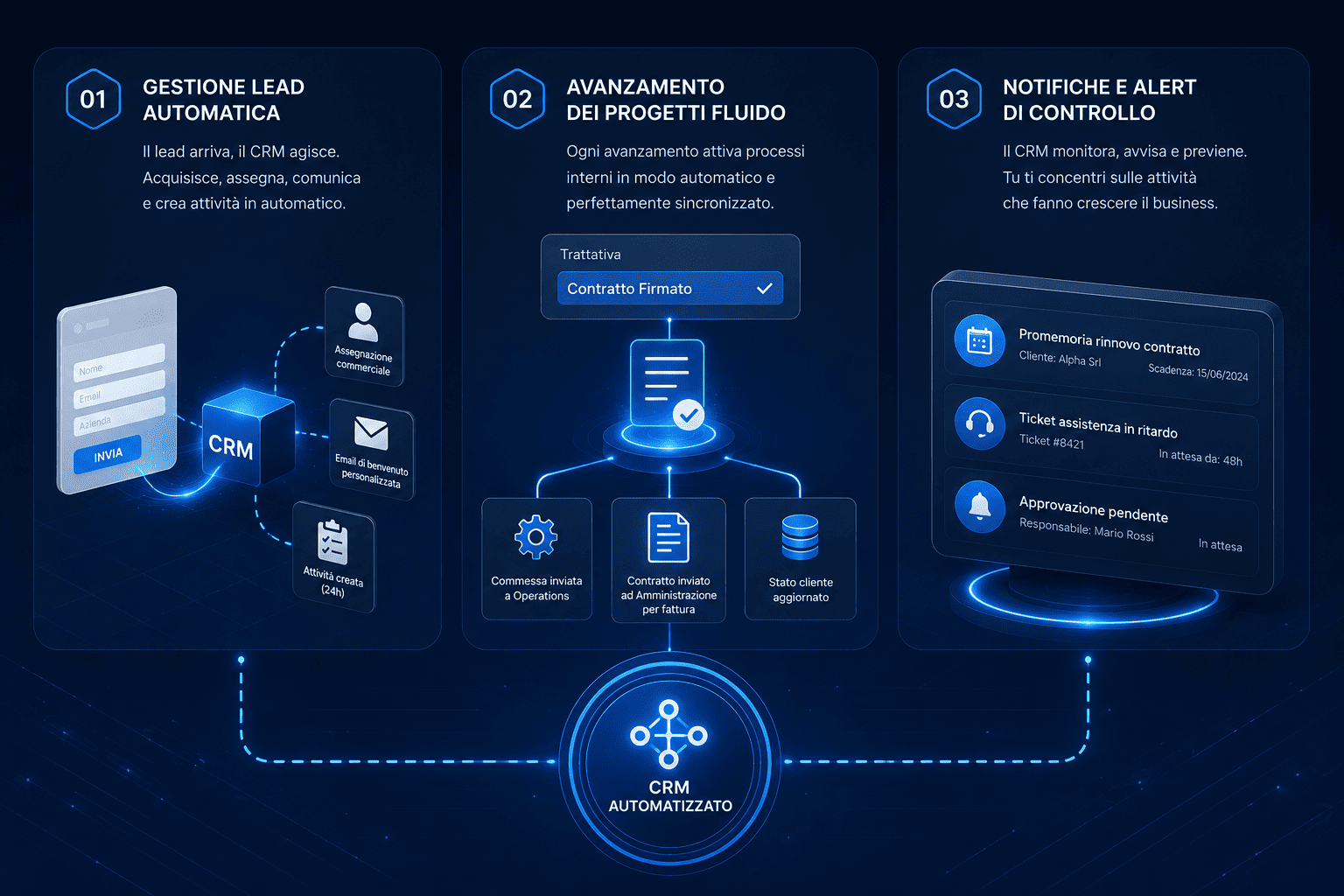
Lead Management
When a user fills out a form on the site, the system can:
- automatically create a contact card;
- record the lead source;
- assign the contact to the right sales representative;
- send a confirmation email;
- create a follow-up activity;
- notify the person in charge;
- classify the lead based on the service requested.
This prevents the contact from being stuck or handled too late.
Every lead that isn't handled immediately loses its sales potential.
Estimates and approvals
A quote above a certain threshold can automatically generate an approval request.
The system can notify the manager, track the status, and prevent the document from being sent before verification.
This reduces errors, unauthorized discounts, and confusing steps.
Transition from sales to operations
When a deal is won, the system can:
- create a job;
- notify the operations department;
- attach documents;
- notify the administration;
- generate internal activities;
- update customer status;
- schedule a kick-off meeting.
This way the sale does not remain isolated.
It automatically becomes operational work.
Customer care and tickets
A support request can automatically become a ticket with a priority, responsible party, and deadline.
The system can send notifications, alerts, customer updates, and internal reminders.
This helps reduce lost requests and response times.
Renewals, deadlines and contracts
Automation can remind you of expiring contracts, payments, renewals, maintenance, appointments, documents to be sent, or periodic tasks.
Not because people aren't paying attention.
But because a system does not forget.
Reports and dashboards
A report does not have to be built manually every time.
If data is collected well, dashboards and KPIs can update automatically.
This allows management to make decisions based on more timely information.
CRM as an automation engine
CRM should not be seen just as a customer archive.
It can become the operational center of company workflows.
A well-configured CRM connects:
- lead;
- clients;
- commercial;
- activity;
- estimates;
- contracts;
- ticket;
- documents;
- deadlines;
- e-mail;
- departments;
- dashboard;
- automations.
This way, every event can generate an action.
A new lead creates a follow-up.
A firm quote generates a reminder.
A successful negotiation activates the operations department.
An urgent ticket alerts the manager.
An inactive customer enters a watchlist.
A nearby renewal generates a commercial notification.
The value is not just practical.
It's strategic.
CRM isn't just about collecting data.
It helps make work move in a more orderly, traceable, and measurable way.
AI and Automation: Be Careful Not to Automate Chaos
In 2026, there will be more and more talk about AI agents, intelligent workflows, and advanced automation.
But there is a risk.
If the company automates messy processes, the result will only be faster chaos.
An AI agent can only be useful if it works within clear rules, reliable data, defined responsibilities, and tracked flows.
Gartner, in the Top Strategic Technology Trends for 2026, includes multiagent systems among the key trends, highlighting the role of modular agents capable of collaborating on complex tasks, improving automation and scalability.
But advanced automation requires governance.
It's not enough to say “AI will do it.”.
We need to define:
- what activities it can perform;
- what data it can use;
- when you need to ask for approval;
- who controls the outputs;
- which exceptions remain human;
- what risks need to be managed;
- which KPIs measure real value.
Academic research too Agentic Business Process Management Systems, published in 2026, highlights an important direction: process automation is evolving towards systems capable of observing the state of processes, reasoning about possible improvements, and taking action to maintain or optimize performance.
This confirms one thing.
The future is not about automating individual, unconnected tasks.
It's about building intelligent, governed, and measurable processes.
The concrete benefits of business process automation
Automating repetitive processes can bring concrete benefits to various areas of the company.
Fewer errors
Reducing manual entries, duplications, and untracked steps lowers the risk of operational errors.
More speed
Activities start automatically when an event occurs.
The team doesn't have to wait for emails, confirmations, or reminders.
More control
Each flow can have a status, responsible, due date and history.
Management can see where the process is stuck.
More productivity
People spend less time on repetitive tasks and more time on strategic activities.
Better customer experience
Faster responses, automatic updates, and more streamlined processes improve the perception of service.
Greater scalability
When customers and requests increase, the system holds up better.
Not everything has to depend on increasing the hours worked.
More reliable data
When data is automatically collected in the right places, reporting and decisions become more robust.
Automation isn't just about saving time.
It helps create a more organized, scalable, and results-oriented company.
How to Get Started Automating Business Processes
Automation must start from a concrete analysis.
Not from the software.
1. Map your current processes
First you need to understand how the company works today.
Where do the requests come from?
Who takes care of them?
Where is the data entered?
Which steps are repeated?
Where do slowdowns occur?
What activities are forgotten?
Which departments are waiting for information?
Without this map, you risk automating disconnected pieces.
2. Identify repetitive tasks
It is necessary to isolate activities that are always repeated in the same way.
For example:
- sending standard emails;
- creation of customer cards;
- lead assignment;
- follow-up reminder;
- internal notifications;
- request for approval;
- status update;
- ticket opening;
- business generation;
- sending reports.
These are often the first areas to automate.
3. Define the rules
Every automation needs a logic.
When does he have to leave?
Who should receive the notification?
Which data needs to be updated?
When is approval needed?
What priority should be given?
What happens if something stays still?
Rules transform automation from a technical gesture to a business process.
4. Centralize data
Automations only work well if the data is organized.
If data is scattered across files, emails, and disconnected tools, automation becomes fragile.
For this reason, CRM, website, forms, customer care, sales, and administration must communicate as much as possible.
5. Start with simple but high-impact processes
There's no need to automate everything right away.
It's best to start with a few workflows with a clear impact.
For example:
- new lead management;
- preventive follow-ups;
- transition from sales to commission;
- urgent ticket notifications;
- reminder of expiring contracts;
- automatic trading dashboards.
6. Measure the result
Every automation must be measured.
Did it reduce management time?
Has it decreased errors?
Did it speed up follow-ups?
Has it improved response times?
Did it make the transitions between departments clearer?
Did it increase lead conversion?
If you don't measure the impact, you don't know if automation is producing value.
Mistakes to Avoid in Business Automation
Automating without understanding the process
If the process is confusing, automation won't fix it.
It just makes it faster.
First we need clarity.
Choose disconnected tools
Adding non-integrated platforms risks increasing fragmentation.
Automation works best when data flows between connected systems.
Automate everything right away
Starting with too many automations can create complexity.
Better to build progressive steps, test and improve.
Don't involve the team
Those who use the process every day need to be listened to.
Often, it is the operational people who know where the most time is wasted.
Don't make exceptions
Not all cases can follow the same rule.
We need to understand which steps need to remain human and which can be automated.
Do not monitor the effects
An automated workflow needs to be controlled.
Needs change, processes evolve, rules need to be updated.
Checklist: Which processes can you automate right now?
| Request | What does it indicate? |
|---|---|
| Is there data manually entered into multiple systems? | Risk of errors and duplications |
| Are leads assigned manually? | Possible commercial delay |
| Are follow-ups dependent on memory? | Opportunity at risk |
| Do quotes require email approval? | Slow and poorly tracked process |
| Are customer inquiries coming in through different channels? | Centralized ticketing is needed |
| Are deadlines checked manually? | Risk of forgetfulness |
| Do departments notify each other by voice or chat? | Untracked passages |
| Are the reports created manually? | Slow data and possible errors |
| Customers not receiving automatic updates? | Less fluid experience |
| Are repetitive tasks taking up too much of your team's time? | High-impact automation opportunities |
If many of the answers are positive, your company already has processes that can be improved with digital management.
Business Process Automation FAQs
What does it mean to automate business processes?
It means transforming repetitive, manual tasks into digital flows that are automatically triggered based on defined rules, events, or process states.
What processes can be automated in an SME?
You can automate lead management, follow-ups, internal notifications, approvals, ticket openings, renewals, deadlines, reports, handovers between departments, and recurring tasks.
Is automation replacing people?
No. Automation should free people from repetitive tasks, allowing them to focus on customer relationships, decisions, strategy, quality, and problem solving.
Where to start to automate?
The first step is to map current processes, identify repetitive tasks, define clear rules, and choose a few high-impact workflows to digitize.
Can CRM automate business processes?
Yes. A well-configured CRM can automate follow-ups, lead assignment, notifications, sales pitches, tickets, deadlines, tasks, and reports related to customers and business processes.
Is AI used to automate processes?
AI can enhance automation, but only if the data is reliable and the processes are clear. Without method, AI risks amplifying errors and confusion.
Conclusion
Automating repetitive business processes doesn't make the company less human.
It means freeing up human time from activities that don't generate true value.
All data copied by hand.
Every standard email sent manually.
Every repeated reminder.
Every approval chased.
Every deadline checked by heart.
Each report is reconstructed at the end of the month.
These are small signs that an organization can become more efficient.
Growth doesn't just depend on how hard a team works.
It also depends on how well the work flows without unnecessary friction.
Digitizing tools is not enough.
We need to digitize processes.
Want to understand which activities are slowing down your business and where you can regain time, control, and productivity?
DigiFe Analyze your workflows, identify repetitive tasks, and configure customized CRM automations to reduce errors, speed up internal processes, and make your organization more fluid, measurable, and growth-oriented.
Start digitizing your processes with the DigiFe team.